AAB vs APK: What Play Requires of Older Apps
An APK is the file that installs on an Android phone, and an AAB (Android App Bundle) is the file you hand to Google Play so it can build the right APKs for each phone. For an app you built yourself this is a settings choice, but for an older app you inherited it’s a small project with a signing step that can lock you out of your own updates if it’s done carelessly. Below is what each format does, what Play accepts, where the size limits sit, and the order to work in when an older app has to make the move.
Search for this topic and you land on a Stack Overflow answer, Google’s reference FAQ, a Reddit thread and a few developer blog posts. Those explain the format for someone writing a first app, but none is written for the person who owns a live app that still uploads APKs and wants to know what the switch will cost. Every limit and rule below was checked against Google’s own documentation while this was written, and the failure points are the ones RapidLabs sees when we take over an Android codebase.
What is the difference between an AAB and an APK?
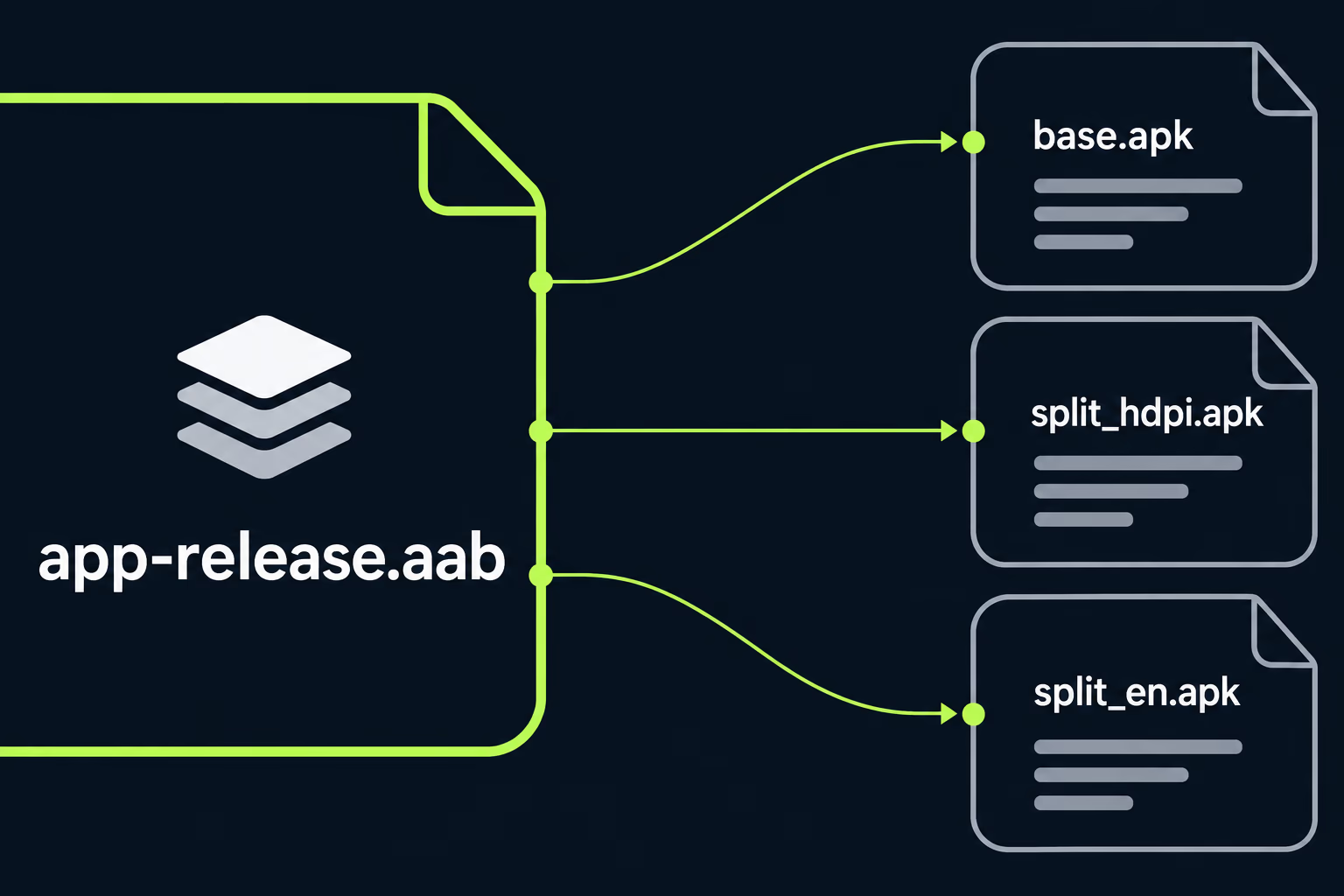
An APK is an installable package that runs on a device, and an AAB is a publishing format that can only be processed by a store. Google’s own FAQ puts it plainly: app bundles are only for publishing and can’t be installed on Android devices, so a distributor has to turn them into APKs before anyone can use them.
The practical difference shows up in what lands on a customer’s phone. When you upload a single APK, every user downloads the same file, which contains every screen density, every language and every processor architecture the app supports. When you upload a bundle, Google Play builds a base APK plus small extra APKs for the specific device, so a phone with one screen density and one language downloads only its own slice.
That is why a bundle is usually smaller to install than the file you built. The format also lets Play split the app into feature modules that arrive when they’re needed instead of at install time, which matters mostly for large apps with rarely used screens.
A bundle isn’t a Google-only invention either, since Google’s FAQ says the format is open source and that some other stores accept it too. You can build a bundle and an APK from the same project in the same afternoon.
Does Google Play require an AAB?
For new apps it does, and Google’s FAQ uses August 2021 as the date that separates older apps from newer ones. Apps that still publish with APKs live under older rules, and the gap between the two sets of rules is where most of the trouble starts.
Private apps are a related case. Google states that private apps published to managed Google Play from the Play Console are required to publish bundles, although APKs are still supported through the Managed Play iframe. If your app is an internal tool for a company’s staff, that sentence decides which path you’re on.
The reason this matters for an inherited app is that nobody tells you the rules changed. A codebase from 2019 keeps producing an APK, the upload keeps working, and the day something forces you into the bundle path is usually a deadline from a different requirement entirely. Our write-up of the Google Play target API level deadline describes one of those, and the 16 KB memory page requirement in Android 16 KB page size is another, where Play reads the file you uploaded and judges it by what’s inside.
So the honest answer for most owners is that you can probably keep uploading APKs today, and that the date you stop being able to is controlled by Google instead of by you. Moving on your own schedule beats moving under pressure with a release blocked.
How do the size limits compare between AAB and APK?
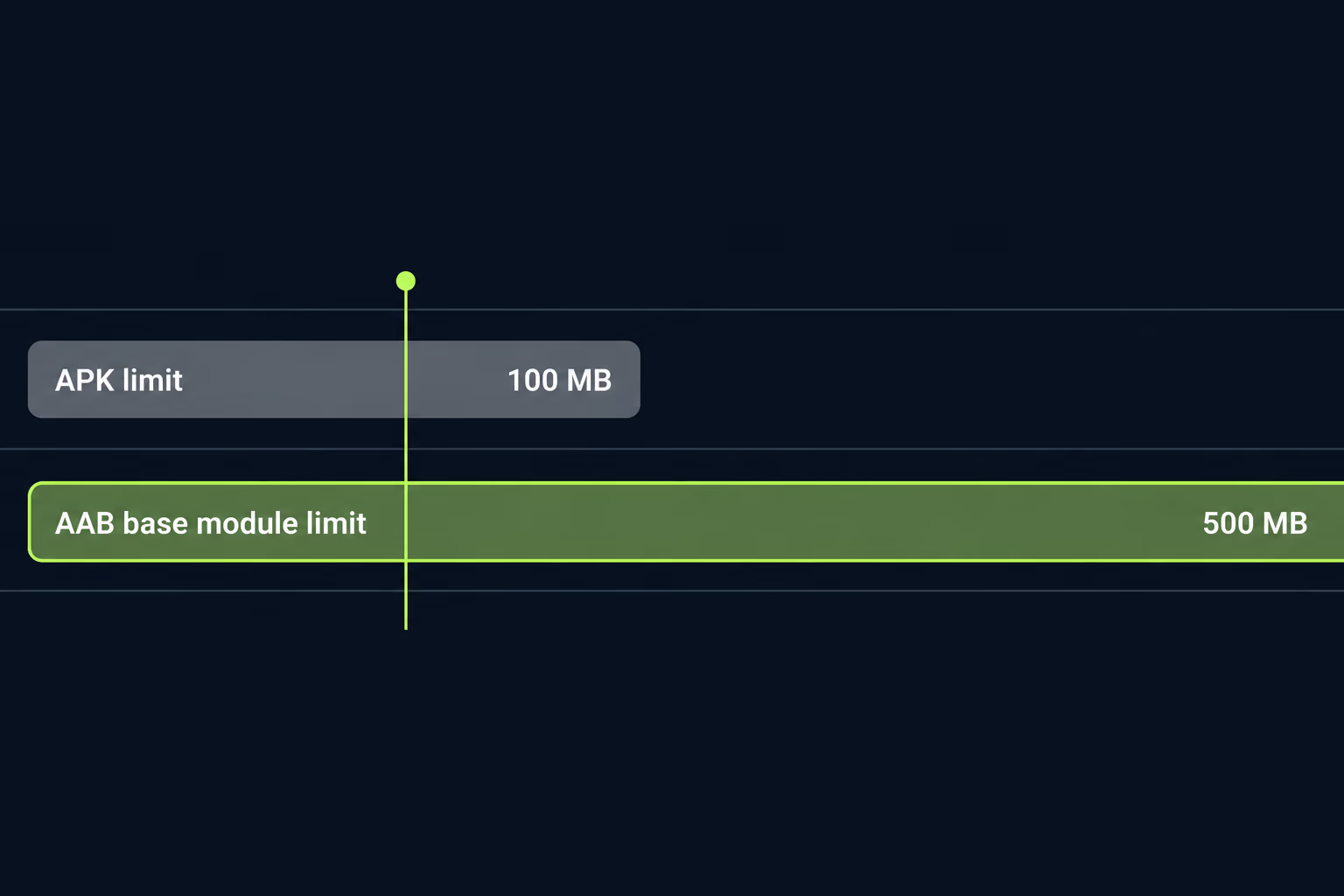
The limits are far looser for bundles, and this is the single most common reason a team moves. Google Play measures size as the compressed download, and for a base module generated from a bundle the maximum is 500 MB. After the base module, Play checks that the cumulative compressed download for any single device stays under 4 GB. Apps still publishing with APKs are held to the legacy limit of 100 MB per APK.
| Published as APK | Published as AAB | |
|---|---|---|
| Base download limit | 100 MB per APK | 500 MB compressed |
| Total per device | Not applicable | 4 GB compressed across modules |
| Large assets | Expansion files (OBB) | Play Asset Delivery or Play Feature Delivery |
| Installable on a phone | Yes | No, Play builds the APKs |
Two details here catch people out. Google Play does not support expansion files for bundles, so an older game or media app that stores extra content as an OBB can’t carry that design across unchanged. The documented replacements are Play Asset Delivery, Play Feature Delivery, or a third-party content delivery network, and the work involved varies from an afternoon to a rebuild of how the app downloads content.
The other detail is user-facing, since an app above 200 MB shows people on mobile data a non-blocking dialog about its size when they install it.
For many business apps the limits alone won’t force a move, and the real reasons are the requirement itself and the smaller downloads. Teams sometimes assume a bundle is only for games, which isn’t the case.
Does moving to an AAB change how the app is signed?
It can, and this is the step that needs the most care. Every Android app must be signed with a key, and Play uses that key to verify that each update comes from the same publisher as the version already on a phone. When you use Play App Signing, Google holds the key that signs what users actually install, and you keep a separate upload key that proves a release came from you.
Google’s FAQ states that Play App Signing is required for new apps so they can use bundles. For an app created before August 2021 the situation is different, because that app was probably signed with a key held on someone’s laptop. Google offers a key upgrade for those apps, which starts using Play App Signing with a new signing key, and with that upgrade the rules for each release change.
After an upgrade, each release must contain two files: a bundle, and a legacy APK signed with your old key. Play uses the bundles to build APKs for new installs and their updates, and it uses the legacy APK for updates to people who already have the app installed under the old key. Over time the legacy installs migrate as people move to new phones.
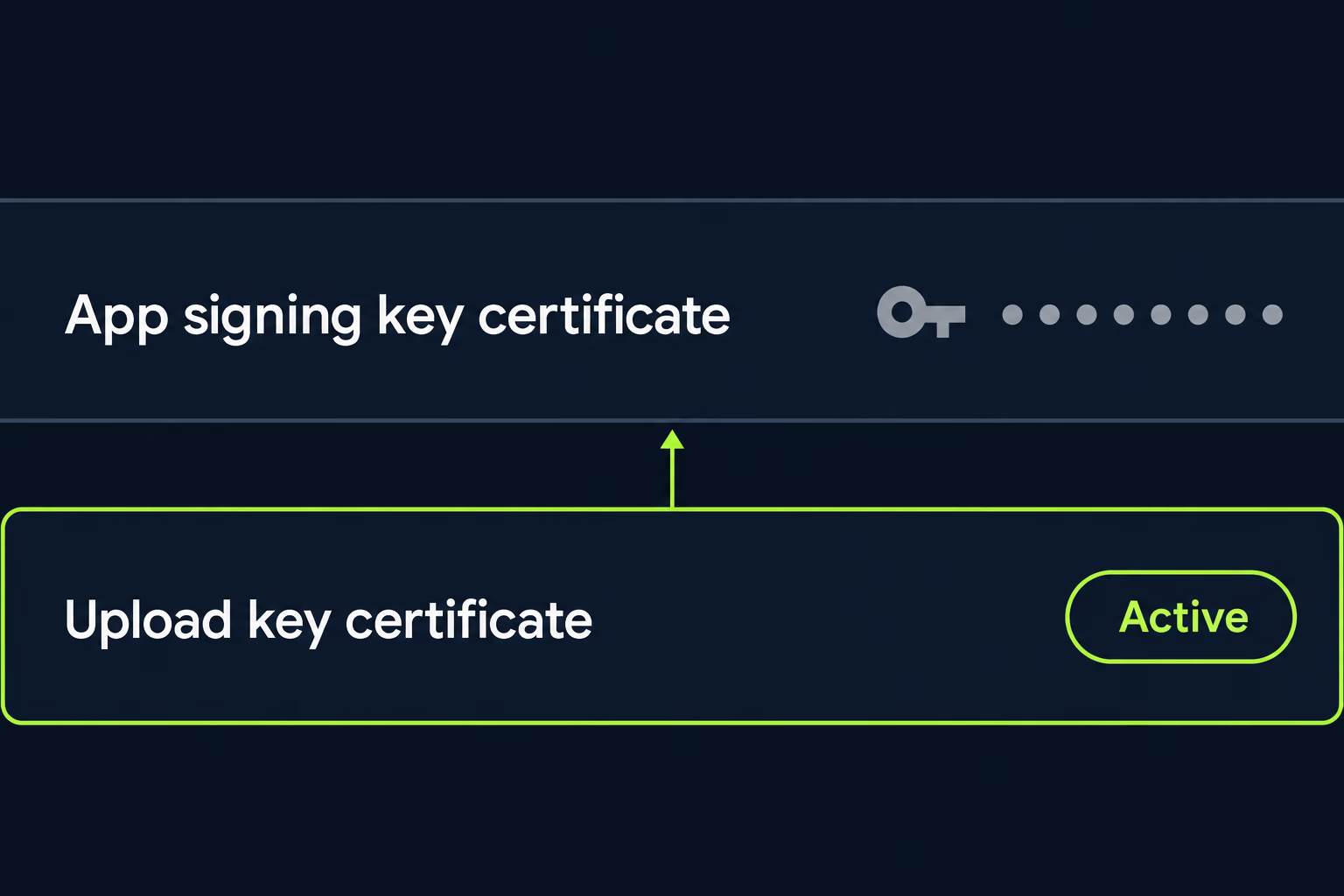
The risk for an inherited app is the old key. If the previous developer took the keystore with them, or the password was in a head that has since left, the choices narrow quickly. Google’s documentation says that with Play App Signing a lost or compromised upload key can be reset from the Play Console, which is the reason Google built the service in the first place.
Before touching any of this, find out four things: whether Play App Signing is already switched on for the app, who has Console access, where the keystore lives, and whether the upload key and signing key are the same file. Our guide to Google Play app transfer covers the account side of that question, since a signing setup you can’t reach is the same problem as an account you can’t reach.
How do you build and test an AAB for an existing app?
You build the bundle with the same Gradle project and a different task. Google’s documentation says that from the command line you run the bundleVariant Gradle task on your app’s base module, so a release build uses bundleRelease in place of assembleRelease. Android Studio does the same thing through its build menu when you choose a bundle instead of an APK.
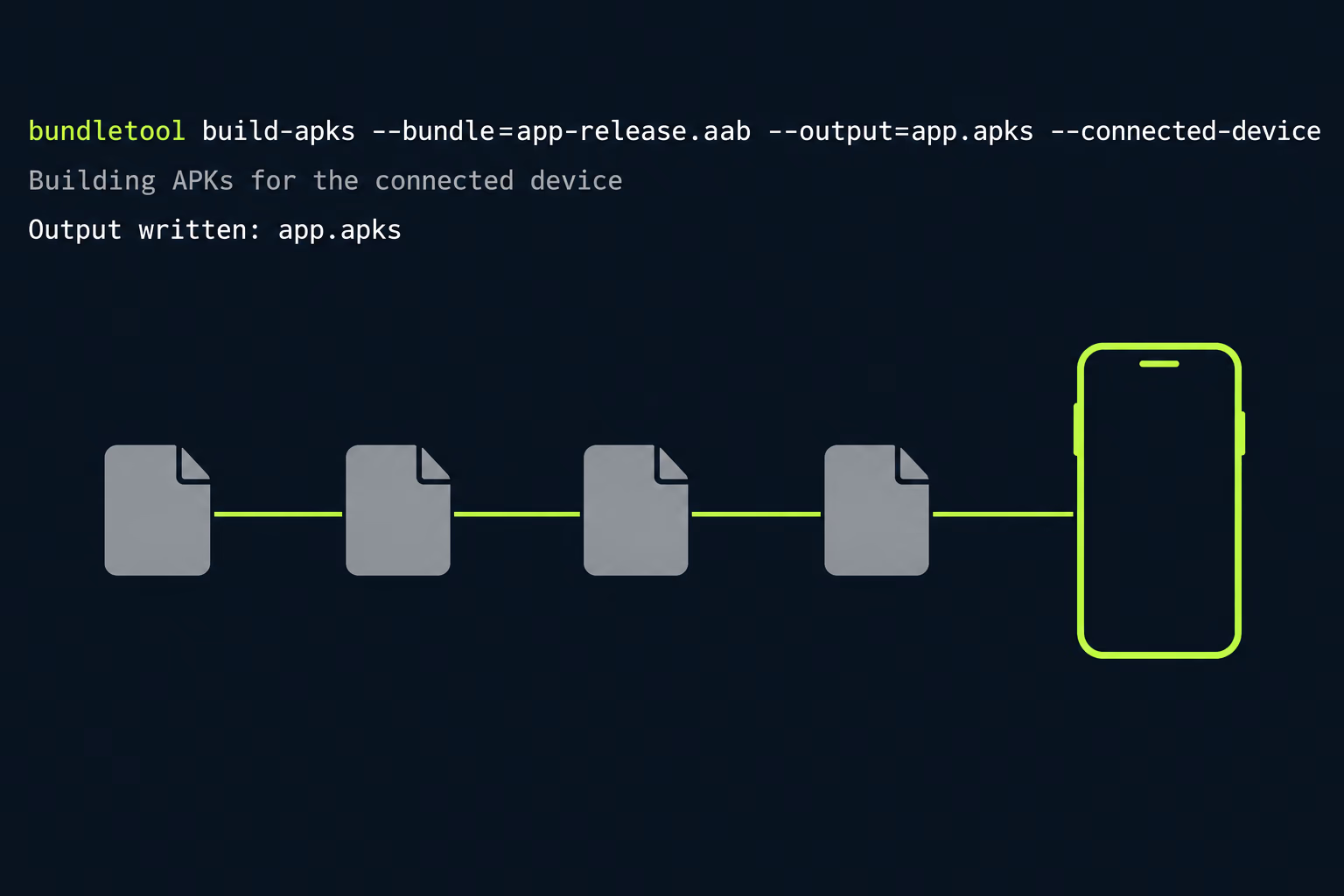
A built bundle can’t be put on a phone directly, so you test it with bundletool, the same utility Play uses internally. The command bundletool build-apks turns a bundle into a set of APKs, and adding the connected device option produces only the APKs for the phone attached to your computer. The universal mode produces one APK containing everything, which is useful for handing to a tester who doesn’t use Play.
Do the local test first, then upload the same bundle to an internal testing track and install it from Play on a real phone. The second test is the one that checks signing, because it goes through the real delivery path instead of a simulation. Teams that skip it find out at production rollout that a service tied to their old certificate has stopped answering.
If the app has native code, add a third check. A bundle upload lets the App Bundle Explorer in the Play Console report on that build, and for an app with .so libraries that report is the quickest way to see the problems described in our 16 KB page size article before a reviewer or a customer does.
What breaks when an older app moves to AAB?
Mostly things that were tied to the old signing key, plus a few build assumptions that nobody wrote down. The most common casualty is any service that checks the SHA-1 fingerprint of your signing certificate. Google’s guidance for its own services is that when you use Play App Signing you read the SHA-1 from the Play Console, because the certificate on installed copies is now Google’s app signing key and not the one on your build machine.
That affects more than it sounds like. Google Sign-In, Maps keys restricted to your app, and Firebase features that ask for a fingerprint can all be configured against the old certificate, and they keep working in your debug builds right up until the first release from Play. The fix is small once you know what’s wrong, which is to add the new fingerprint next to the old one in each service.
The second group is build configuration. Older projects often have a custom Gradle step that renames or copies the APK output, a CI job that uploads an APK to a distribution service, or a release script that checks for a file extension. Each of those fails quietly when the build produces a bundle, and a pipeline that fails quietly is worse than one that fails loudly.
The third group is anything that depended on the APK being one file, such as apps that shipped extra content as expansion files or code that inspects the installed package. A short audit of the release scripts and that code is enough to find these.
None of these problems is hard on its own, and they’re the usual contents of a stabilization project. If you’ve inherited the app and want an engineer to look at the build before you flip anything, our mobile app stabilization work starts with exactly that kind of read of the pipeline.
Can you ship an APK and an AAB at the same time?
Yes, and for many apps you should. Google’s FAQ is clear that creating bundles doesn’t stop you from publishing elsewhere, because you can build a bundle and an APK at the same time and send each to the store that wants it. Play takes the bundle, and a store or website that only handles APKs gets the APK.
The one rule that matters is signing consistency. Google describes two ways to keep a single key across stores: generate a key locally and upload a copy of it to Play, or use the Google-generated key and download distribution APKs from the Play Console that are signed with it. The first approach keeps your build in your hands, and the second keeps the key out of your hands entirely, which suits teams that have lost track of keystores before.
Cross-store updates only work when the signature matches, so decide on the approach before you publish the first bundle. A mismatch means a user who installed from one store can’t update from another.
What should you do first with an app that still ships APKs?
Start with a read-only check and leave the build alone until you’ve done it. Open the Play Console, look at the app signing page, and note whether Play App Signing is on. Then check the release history for which file types have been accepted, find out who holds the keystore, and confirm that your own account has the access to change releases.
With those four answers you can pick one of three paths. If Play App Signing is already on and the keys are accounted for, the switch is a build change plus a round of testing, and it’s the cheap case. If the app predates the requirement and the key is safe, the key upgrade path applies, and each release carries a bundle and a legacy APK for a while. If the key is lost, you’re in recovery territory, and that needs a plan before any release goes out.
Whichever path applies, test the exact bundle you intend to ship, on a closed track, with the fingerprint of every dependent service updated first. The testing rules for new developer accounts are covered in Google Play closed testing, and checking that your quality numbers hold after the switch is a job for Android vitals.
The format question is the easy part, since the build change takes an afternoon. What decides whether the move is quiet or painful is who holds the keys and whether anyone has written down how a release gets made. If that is the part you’re unsure about, talk to a senior engineer about your app and RapidLabs will read the pipeline and the Console with you before anything changes.
Frequently asked questions
Can I still upload an APK to Google Play?
It depends on when the app was created and how it's distributed. Google's own FAQ treats August 2021 as the dividing line between older apps and new ones, and new apps are published as app bundles. Apps that still publish with APKs fall under the legacy 100 MB APK limit instead of the bundle limits, and private apps on managed Google Play are required to publish bundles, with APKs still supported through the Managed Play iframe. Check what your Play Console release screen actually accepts before planning around it.
Is an AAB file the same thing as an APK?
They are different files. An APK is the installable file that runs on a phone, while an AAB is a publishing format that can't be installed on any device. Google Play takes your bundle and generates the APKs each phone needs from it, which is why a bundle can't be sideloaded or emailed to a tester the way an APK can. If you need something installable from a bundle, the bundletool utility can produce a universal APK for you.
Why is my AAB smaller than my APK on Google Play?
Because Play builds a separate set of APKs for each device configuration and delivers only the pieces that phone needs. A universal APK carries every screen density, every language and every processor architecture at once, while a user's phone receives just its own slice. The size you see in the Play Console is the compressed download for a reference device, not the size of the file you uploaded.
Do I need Play App Signing to publish an AAB?
For new apps you do, because Google's FAQ states that Play App Signing is required for new apps so they can use app bundles. For apps created before August 2021 there's a key upgrade option that lets the app start using Play App Signing with a new signing key, and after that upgrade every release has to include both a bundle and a legacy APK signed with the old key.
How do I test an AAB on a real phone before releasing it?
You can run the bundletool build-apks command with the connected device option to produce a set of APKs matched to the phone plugged into your computer, then install them with bundletool as well. The other route is uploading the bundle to an internal or closed testing track and installing from Play, which tests the real delivery path including signing. Do both when an older app is making the jump, because they catch different problems.
What happens to my Google Maps or Firebase keys when I switch to AAB?
Anything that checks the SHA-1 fingerprint of your signing certificate can start failing, because with Play App Signing the certificate on installed copies belongs to Google's app signing key rather than the key you built with. Google's guidance is that when you use Play App Signing you read the SHA-1 from the Play Console. Add that fingerprint to every service that restricts by certificate before you ship.
Stuck on a release, a crash, or an app nobody owns?
RapidLabs maintains, stabilizes and takes over existing iOS and Android apps. Send the app link, the stack, and what is going wrong, and you will get a plain answer on whether you need help at all.
Talk to a senior engineer about your app